
Your now playing,
right in the menu bar.
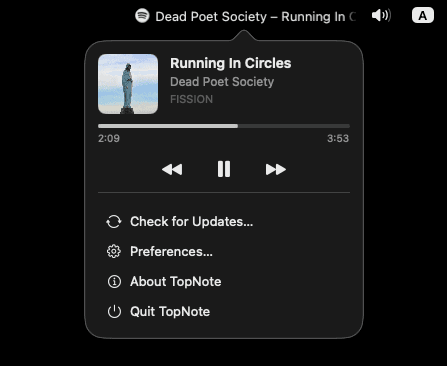
TopNote sits quietly in your macOS menu bar and shows exactly what's playing — Spotify, Apple Music, YouTube, or anything else — with a scrolling title, live artwork, and one-click controls.
Free · macOS 13 Ventura or later · Apple Silicon & Intel
Everything you need.
Nothing you don't.
TopNote does one job — showing what's playing — and does it properly.
Works with everything
Spotify, Apple Music, YouTube, podcasts, browsers — TopNote reads system-wide now-playing info, with real artwork, not just a hardcoded list of apps.
Smooth scrolling marquee
Long titles glide by at a smooth, pixel-fluid 30fps instead of getting clipped. Short ones just sit still — no unnecessary jitter.
Full playback control
Play, pause, skip forward or back straight from the menu bar popover, along with live artwork and a progress bar that ticks in real time.
Make it yours
Tune icon size, text width, scroll speed, and whether to hide the title while paused — with a live preview before anything is saved.
Feather-light
A native AppKit menu bar item, not a bundled browser. TopNote draws its own pixels and stays out of your CPU's way.
Private by design
No accounts, no analytics, no network calls beyond reading what's already playing on your own Mac. Nothing ever leaves your machine.
One menu bar item. Any source.
TopNote doesn't care where the audio comes from — if macOS knows it's playing, TopNote shows it, complete with the source app's icon.
Tune it until it disappears.
Every menu bar is different. TopNote ships with a live, what-you-see-is-what-you-get preferences panel so you can dial it in without guessing — nothing touches your real menu bar until you hit Save.
- Icon size, from a discreet 12pt to a bold 24pt
- Text area width, 100–320pt before it needs to scroll
- Scroll speed, or turn scrolling off entirely
- Hide the title while paused, show only the source icon
- Launch at login, one toggle, applies instantly
Get TopNote
Free to download. Drag it to Applications and you're done.
TopNote is an independent, ad-hoc signed app — macOS will warn that it can't verify the developer. Right-click the app and choose Open once to launch it; a README in the DMG walks through it too.